
Download Solscape X – Free Astronomy Software for macOS
Overview of Solscape X
Solscape X is a lightweight, free astronomy application designed exclusively for macOS users. First introduced to the public in 2006, the program quickly found a niche among amateur astronomers and educators who needed a simple yet powerful tool for visualizing the solar system, tracking planetary positions, and exploring celestial events. With its current version 2.6 released on April 29 2009, Solscape X continues to deliver a clean interface that runs smoothly on Mac OS X and earlier releases. Despite a modest download history—747 total downloads since its launch and a recent lull—it remains a reliable option for anyone seeking an educational, no‑cost solution in the Science & Education > Astronomy category. The software is available only in English, requires minimal storage space, and is built to run securely on older Mac hardware, making it an ideal companion for students, hobbyists, and teachers who need a dependable solar‑system simulator without the overhead of modern, resource‑hungry alternatives.
Key Features, Compatibility, and System Requirements
- Real‑time solar‑system visualization with accurate planetary orbits.
- Interactive 3D view that lets users rotate, zoom, and pan across celestial bodies.
- Event calendar showing upcoming eclipses, transits, and meteor showers.
- Customizable time controls for fast‑forwarding or rewinding astronomical events.
- Lightweight design requiring less than 20 MB of disk space.
- Support for Mac OS X (10.4 Tiger and later) and legacy Mac operating systems.
- English‑only interface with clear labels and tooltips for easy learning.
- Free to download and use, with no hidden fees or registration requirements.
Solscape X runs on any Mac computer that supports Mac OS X 10.4 (Tiger) or newer. Because the program was last updated in 2009, it is fully compatible with older hardware, making it a perfect fit for schools or individuals still using legacy Macs. The application does not depend on external libraries or internet connectivity after installation, which further reduces the chance of compatibility issues on isolated or offline systems.
System requirements are intentionally modest: a 1 GHz processor, 256 MB of RAM, and at least 20 MB of free disk space. The program’s simple graphics engine ensures smooth performance even on machines that would struggle with modern 3D astronomy suites. Users should also have the ability to grant the app permission to access the local drive during installation, a standard macOS security step that ensures the software can store user preferences and cached data safely.
Installation, First‑Run Usage, Pros & Cons, and Frequently Asked Questions
Step‑by‑Step Installation Guide
- Visit the official download page and click the “Download Solscape X” button. The file will be a .dmg disk image.
- Once the download completes, double‑click the .dmg file to mount the disk image.
- Drag the Solscape X icon into your Applications folder. macOS may prompt you to confirm the action; click “Copy”.
- Eject the disk image by right‑clicking its icon on the desktop and selecting “Eject”.
- Open the Applications folder and double‑click Solscape X to launch the program for the first time.
- If macOS displays a security warning (“Solscape X can’t be opened because it is from an unidentified developer”), go to System Preferences → Security & Privacy, click “Open Anyway”, and confirm.
First‑Run Usage Tips
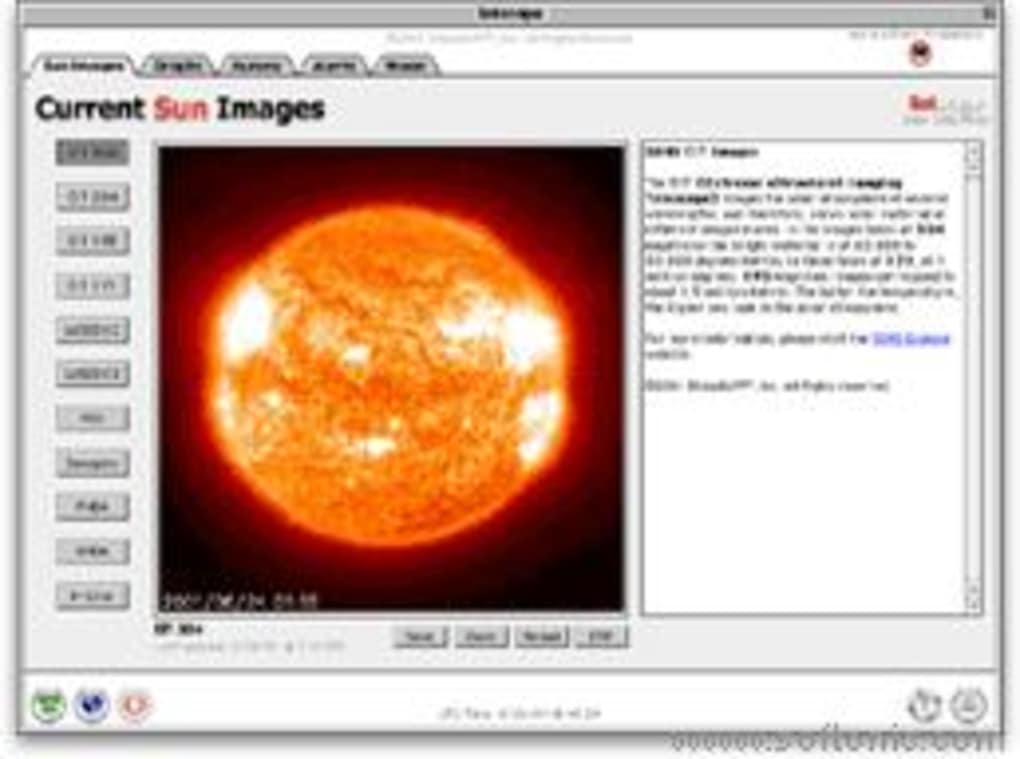
Upon launching, Solscape X opens to a default view of the solar system on the current date. Use the mouse wheel or trackpad pinch gesture to zoom in and out, and click‑drag to rotate the view. The toolbar at the top offers quick access to time controls, allowing you to speed up or reverse time to see planetary motion. The “Events” menu provides a calendar of upcoming astronomical phenomena; selecting an event will automatically position the view to highlight the relevant bodies. For educational purposes, the “Info” panel displays key data such as orbital periods, distances, and visual magnitude for each object.
Pros & Cons
- Pros
- Completely free with no hidden costs.
- Runs on older Macs, making it accessible for schools with legacy hardware.
- Intuitive interface that requires little to no learning curve.
- Low storage footprint and fast startup time.
- Accurate planetary positions and up‑to‑date event calendar.
- Cons
- No support for Windows, Linux, Android, or iOS platforms.
- Last updated in 2009; lacks modern graphics enhancements.
- English‑only UI may limit non‑English speakers.
- No built‑in plugin system for extending functionality.
- Limited community support due to its age and niche user base.
Frequently Asked Questions
Is Solscape X safe to download?
Yes. The software is distributed from the official project page and is free of malware. As with any download, verify the URL and run a quick virus scan if you have concerns.
Can I use Solscape X on the latest macOS versions?
The program is compatible with macOS 10.4 and later, which includes recent macOS releases. However, because it was last updated in 2009, some visual elements may appear dated on high‑resolution Retina displays.
Do I need an internet connection to use Solscape X?
No. After installation, the software runs entirely offline. The event calendar is pre‑loaded, but you can manually update dates if you wish.
Is there a way to export screenshots or data?
Yes. Use the built‑in “Export Image” function in the File menu to save a PNG of the current view. Data about planetary positions can be copied from the Info panel.
Can Solscape X be used in a classroom setting?
Absolutely. Its lightweight nature and free license make it ideal for classroom demonstrations, and the event calendar can be used to plan observation activities.
Conclusion & Call to Action
Solscape X stands out as a reliable, free astronomy program that fulfills the core needs of students, educators, and hobbyists who work on macOS. Its modest system requirements, straightforward interface, and accurate planetary data make it a timeless choice, even though it lacks modern visual polish and cross‑platform availability. If you are looking for a secure, easy‑to‑install tool that lets you explore the night sky without spending a dime, Solscape X is worth a download. Click the button below to get the latest version, and start charting the heavens on your Mac today.







